

Search for an Amazon product description template and you expect one box to fill in. Amazon gives you six pieces of copy: the title, the new Item Highlights field, five bullets, the description field, backend search terms, and A+ Content if you are brand registered.
The Amazon product description template most sellers work from is out of date. On July 27, 2026, Amazon cut titles from 200 characters to 75 in every category except media and moved the overflow into a searchable Item Highlights field, according to the Seller Central announcement.
Each field has its own limit, its own indexing behavior, and its own way of getting a listing suppressed, so a template that ignores those differences is a paragraph generator. Gembah works upstream of the listing, where the differentiators get decided.
Also Read
- Maximize Your Amazon Listing Optimization With 7 Basic Rules
- Types of Sellers on Amazon: Which One Suits You?
- How to Get Started with Amazon FBA in 6 Steps
TL;DR
Fill six fields, not one. Title: 75 characters, brand plus product noun plus one differentiator. Item Highlights: 125 characters for the material, use case, and comparison terms that no longer fit. Bullets: benefit in caps, then the feature and the spec that proves it.
Description: problem, solution, use cases, what is in the box, care and compatibility, plain text only. Backend terms: synonyms and misspellings under 249 bytes. A+ Content: the same story in visual form. Write for the question a buyer would ask.
Key Points
The rules moved in 2026, and most templates online have not caught up.
- Titles are 75 characters now. The cap hit July 27, 2026 in every category except media, and Amazon rewrites over-length titles itself.
- Item Highlights holds what got cut. A searchable 125-character field most sellers leave empty.
- Amazon has six copy fields, not one. A template covering only the description paragraph leaves the highest-impact fields blank.
- Bullet limits vary by category. Many allow 500 characters, apparel and its neighbors cap at 255, and Amazon recommends shorter.
- The description field is plain text. HTML support ended in 2021, so tags get stripped and your formatting vanishes.
- Backend search terms fail silently. One byte over and Amazon ignores the entire field.
- AI-assisted shopping rewards completeness. Amazon folded Rufus into Alexa for Shopping in May 2026, and it reads listings that answer questions.
- A template cannot fix a product with nothing to say. Differentiation is a development decision, not a copywriting one.
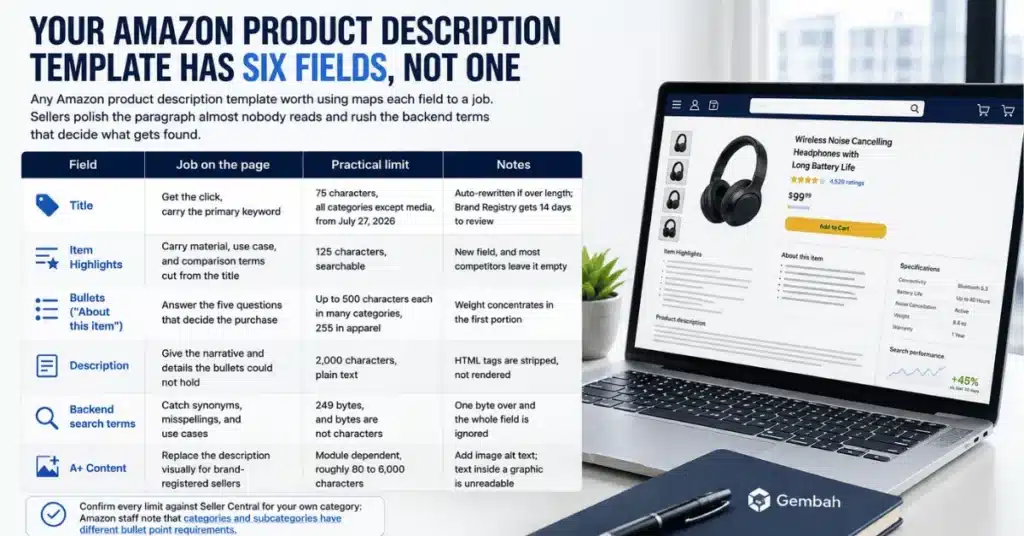
Your Amazon Product Description Template Has Six Fields, Not One
Any Amazon product description template worth using maps each field to a job. Sellers polish the paragraph almost nobody reads and rush the backend terms that decide what gets found.
| Field | Job on the page | Practical limit | Notes |
|---|---|---|---|
| Title | Get the click, carry the primary keyword | 75 characters, all categories except media, from July 27, 2026 | Auto-rewritten if over length; Brand Registry gets 14 days to review |
| Item Highlights | Carry material, use case, and comparison terms cut from the title | 125 characters, searchable | New field, and most competitors leave it empty |
| Bullets (“About this item”) | Answer the five questions that decide the purchase | Up to 500 characters each in many categories, 255 in apparel | Weight concentrates in the first portion |
| Description | Give the narrative and details the bullets could not hold | 2,000 characters, plain text | HTML tags are stripped, not rendered |
| Backend search terms | Catch synonyms, misspellings, and use cases | 249 bytes, and bytes are not characters | One byte over and the whole field is ignored |
| A+ Content | Replace the description visually for brand-registered sellers | Module dependent, roughly 80 to 6,000 characters | Add image alt text; text inside a graphic is unreadable |
Confirm every limit against Seller Central for your own category: Amazon staff note that categories and subcategories have different bullet point requirements.
The Template: Title and Item Highlights
Title formula (75 characters): [Brand] [Size or Count] [Core Product], [Defining Feature], [Variant]
Seventy-five characters is roughly what a phone already displayed, so the cut deletes the part nobody read. What it does not tolerate is a second differentiator: pick the term the product should own and move the rest down. Use numerals, since “32 oz” beats “thirty-two ounce.”
Leave out anything Amazon treats as promotional: no “best seller,” no “free shipping,” no “sale,” no all-caps words, no symbols. Keep one variant per title, and rewrite over-length titles yourself rather than accepting Amazon’s rewrite.
Item Highlights formula (125 characters): [Material or technology], [performance spec], [key dimension], [primary use case or user], written as comma-separated phrases rather than a sentence.
Treat Item Highlights as the field competitors have not filled in. Amazon confirms that item name and item highlights are both inputs for search, with neither prioritized, and highlights display beneath the title as of August 10, 2026.
The Template: The Five Bullets
Formula per bullet: BENEFIT IN 2 TO 5 CAPPED WORDS: [the feature that delivers it], [the spec or number that proves it], [who or what situation it is for].
The common mistake is writing five versions of the same claim. Give each a distinct job:
- Bullet 1: the single reason someone buys this instead of the alternative
- Bullet 2: the specification that makes bullet 1 credible
- Bullet 3: fit, sizing, capacity, or compatibility, the field that drives returns when unclear
- Bullet 4: the use case or the person, written so a buyer recognizes themselves
- Bullet 5: what is included, plus care, warranty, or support
Keep the front of each bullet dense; Amazon’s seller education advises you to start with a one- or two-word description, then explain in 100 characters or fewer.
Check your category cap first. Many allow 500 characters per bullet, apparel and adjacent categories enforce 255, and Amazon’s style guides recommend 150 to 200, about 1,000 characters total. Bullets absorbed the title’s old work, so differentiators two and three live here.
The Template: The Description Paragraph
The description field holds 2,000 characters of plain text. Four short paragraphs, one job each:
- Paragraph 1 (2 to 3 sentences): name the problem and the person who has it, in their language.
- Paragraph 2 (3 to 4 sentences): how the product solves it, with the material, dimension, or number that makes it checkable.
- Paragraph 3 (2 to 3 sentences): the two or three situations it fits, and what is in the box.
- Paragraph 4 (1 to 2 sentences): care, compatibility, warranty, and the brand line carrying to your other listings.
Write it as plain text. Amazon announced that after July 30, 2021 it would stop supporting HTML tags in the product description, so any Amazon product description HTML gets stripped rather than rendered. Build structure with line breaks.
The field does double duty: what a buyer reads without A+ Content, and a data source Amazon reads anyway.
The Template: Backend Search Terms
Use this field only for what did not fit elsewhere: synonyms, alternate spellings, misspellings, Spanish-language terms, and use-case phrases. No commas, no repeated words, no brand names you do not own, no ASINs.
Count bytes, not characters: accented and non-Latin characters consume more than one each. Amazon’s guidance, discussed in the seller forums thread on the search terms attribute, sets the ceiling at less than 250 bytes, making 249 the maximum. Exceed it and the field is ignored silently.
Three Filled Examples
Three fills of the template, using a placeholder brand.
Kitchen: a 32 oz insulated tumbler
Title (66 characters): Northbay 32 oz Insulated Tumbler, Leak-Proof Lid, Fits Cup Holders
Item Highlights: Triple-wall stainless steel, 24-hour ice retention, 3.35-inch base, matte sage, for commuters and desk workers
Bullet 1: STAYS COLD 24 HOURS: triple-wall vacuum insulation holds ice through a full workday, tested at 24 hours in a 72 degree room, for commuters and desk workers
“Fits cup holders” earns title space because it is the objection that fills one-star reviews; its proof, the 3.35-inch base, moves to Item Highlights. “Tested at 24 hours in a 72 degree room” then makes bullet 1 checkable.
Apparel: a 7-inch training short
Title (69 characters): Northbay Men’s 7″ Training Short, Four-Way Stretch, Liner-Free, Slate
Item Highlights: Recycled poly-spandex, zip back pocket, 7-inch inseam, no liner, for gym and running
Bullet 3: TRUE TO SIZE, NO LINER: sits at the natural waist with a 7-inch inseam, size up if you are between waist sizes, drawcord adjusts 2 inches
Bullet 3 is apparel’s most valuable, because sizing ambiguity drives returns and telling a between-sizes buyer what to do beats another adjective about fabric. Apparel also caps bullets at 255 characters rather than 500.
Baby gear: a four-bottle starter set
Title (71 characters): Northbay Baby Bottle Set, 4 x 8 oz Bottles, Slow-Flow Nipples, BPA-Free
Bullet 5: WHAT IS INCLUDED: four 8 oz bottles, four slow-flow nipples, two travel caps, and a cleaning brush, all dishwasher safe on the top rack and free of BPA, BPS, and phthalates
Bullet 5 pairs the inclusion list with the safety language, so a parent gets both answers at once. Naming BPS and phthalates matters, since “BPA-free” is table stakes.
A spec you can prove beats a sentence you can polish
Every number in those examples came from the product, not the copywriter. When you need the spec to be real before it goes into a bullet, talk to a Gembah expert.

What Changed for Listing Copy in 2026
Titles dropped to 75 characters on July 27, 2026. Amazon posted the change on June 10, applied it to every category except media, and added the 125-character Item Highlights field, as trade publication PPC Land reported. Enforcement is automatic: over-length titles get rewritten while listings stay active.
Brand Registry members get 14 days to review, modify, and approve the rewrite; sellers without it do not. The consequence is prioritization: 200 characters let you hedge across four keyword variants, and 75 does not.
The second change is who reads the listing. Amazon brought Rufus and Alexa+ together as Alexa for Shopping, announced May 13, 2026, free to US customers and sitting in the search bar.
That is a different reader, not a new field. Buyers ask comparison and use-case questions instead of keyword strings, so name the use case, say who it is for, and give the number that settles it. Fill in every structured attribute your category offers, and keep all six fields telling one story.
Five Ways Sellers Break Their Own Listings
Most damaged listings are self-inflicted, and a handful of mistakes account for most of them.
- Pasting the supplier’s copy. It is duplicated across every competitor selling the same white-label unit, and it carries no differentiation.
- Keyword stuffing the bullets. It reads as noise to buyers and adds nothing once indexing weight is spent.
- Restricted claims. Guarantees, “#1,” pricing language, and promotional phrases in the title routinely trigger suppression.
- HTML in the description. Tags get stripped, so a formatted description collapses into a wall of text nobody finishes.
- Leaving titles for Amazon to fix. Any title over 75 characters gets rewritten by an algorithm optimizing for compliance, not positioning.
A sixth habit costs more than any of those: skipping the return-driving field. Sizing, capacity, and compatibility are where vague copy turns into returns, and a return costs you the unit, the shipping, and often the review.
A+ Content: When the Description Stops Being the Description
Brand-registered sellers get A+ Content, which replaces the description visually. Build the same story visually: a hero repeating the core benefit, a comparison chart against your variants, a use-case module, and a specification table.
Fill in the alt text on every A+ image. Text baked into a graphic is not readable, and an Amazon community manager has stated that alt-text is used by screen reader apps and helps your products in search results. Do not extend that to body copy: A+ converts, the other fields get you found, and the description stays filled in.
Brand Registry takes a trademark. Amazon accepts an active registered trademark or a pending application filed through IP Accelerator, and the USPTO’s process overview describes months of waiting before an examiner reviews a filing. Our guide to types of sellers on Amazon covers which model this fits.
Build the product the A+ page is supposed to sell
Comparison charts only work when there is a real difference to chart. When your next SKU needs that difference engineered in, talk to a Gembah expert.
Where the Description Actually Comes From
The hardest listings to write belong to products identical to everything else in the category. No Amazon product description template rescues that, because the spec in bullet 2 has to exist in the product first: the wall thickness, the fabric weight, the battery capacity.
If you are launching rather than relisting, the sequence runs product first, then listing. Our product launch guide covers the path, the 90-day Amazon go-to-market plan covers life after launch, and sellers still setting up should start with how to get started with Amazon FBA.
Once live, treat the listing as a test surface. Change one field at a time, and let our Amazon listing optimization guide set the order.
How Gembah Helps Before the Listing Exists
Gembah’s product development services cover research, design, and engineering, where the specs that make a bullet credible get decided. A 24-hour ice retention figure is a design output, not a copy decision.
Gembah’s factory network spans China, Vietnam, India, and Mexico, matched to your category and volume. Quality control runs in process and at final inspection, protecting the review score your listing depends on more than any copy change.
For brands moving from reselling to a product of their own, that path is the difference between another category entry and something with a differentiator worth writing about.
Questions Sellers Ask About Amazon Listing Copy
Does the description field still matter if I have A+ Content?
Yes. A+ Content replaces the description visually, so few buyers read the field on a brand-registered listing. It still holds 2,000 characters of plain-text detail Amazon’s systems read, and it renders if a module fails.
What happens if my title is still over 75 characters?
Nothing breaks immediately. Amazon began generating recommendations for over-length titles on July 27, 2026, and listings stay active and editable meanwhile. Those titles get updated gradually, and Brand Registry members get 14 days to review or modify the suggestion.
How many keywords should go in backend search terms?
Fewer than most sellers put there. The field caps at less than 250 bytes, so 249 is your ceiling, usually 25 to 35 short terms. Use it only for synonyms, misspellings, and phrases used nowhere else.
Does Amazon index the text in A+ Content?
Amazon has not confirmed that A+ body copy is indexed, and seller testing suggests it is not. Image alt text is what Amazon has confirmed helps products surface, making it the one A+ field with a documented discovery role.
Filling Six Fields Instead of One
An Amazon product description template is really six templates, and the value comes from giving each field a distinct job instead of repeating three claims six times. The July 2026 title cut makes that mandatory: one differentiator up top, comparison terms in Item Highlights, the rest in the bullets.
Fill the fields, respect the limits, write for the question a buyer would ask, and tie every claim to a real specification. A template organizes what you know; it cannot invent a reason to buy.
Start with a product worth describing
If there is nothing distinctive to write about yet, that is a product problem, not a copy problem. When you are ready to develop one worth describing, talk to a Gembah expert.